DIGITAL TRANSFER OF EQUITY

Transfer of Equity.
Fully Digital.

Add or remove an owner on a title with a Qualified Electronic Signature.
No ID1 form, no witness and no in-person appointment.

The problem

No conveyancer for the person leaving?
Until now, that meant an ID1.

When the outgoing transferor has no conveyancer, HMLR requires an ID1. That means an in-person appointment and a certified form that is only valid for 3 months.

Today's paper route
6 stepsIn Person

Unrepresented transferor. An ID1 for every exit.

01
TR1 sent
To every party via post.
02
ID1 form
For the person leaving.
03
Appointment
In person, with a conveyancer.
04
Photo ID
Originals plus photos.
05
3-month clock
The ID1 expires.
HM Land Registry
06
Lodged at HMLR
AP1 and TR1.
With Veyco
3 stepsIn App

Digital Transfer of Equity. No ID1. No witness.

01
TR1 sent
From the Partner Portal or API.
02
Signed by QES
ID check and signature on their phone.
HM Land Registry
03
Lodged at HMLR
With a full digital audit trail.
Why switch

3 weeks on paper.
3 minutes with Veyco.

Paper route
Up to 3 weeks
​
With Veyco
Under 3 minutes
​
✓
No appointment or witness
✓
Nothing to print or post
✓
Signed on their phone
Take the tour

See it from every side of the transfer.
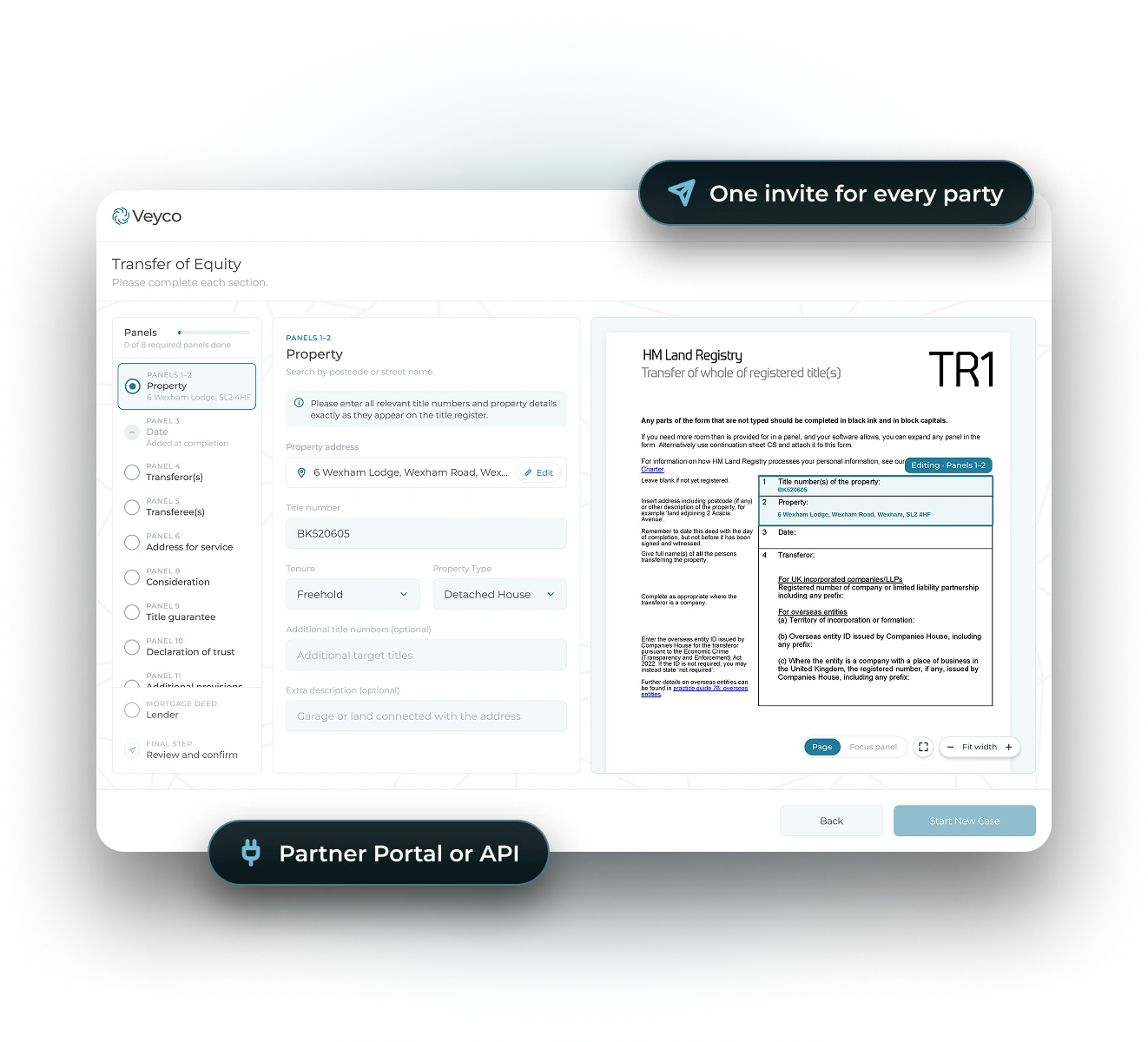
01
Send one invite
Invite every party from the Veyco Partner Portal, or direct from your case management system via API.
02
Track every party
See each party's ID check and signing status in one place.
03
Get back a signed TR1
With a full digital audit trail, ready for HM Land Registry submission.
Veyco TR1 (Transfer of Equity) builder in the Partner Portal, with pills for one invite for every party and Partner Portal or API
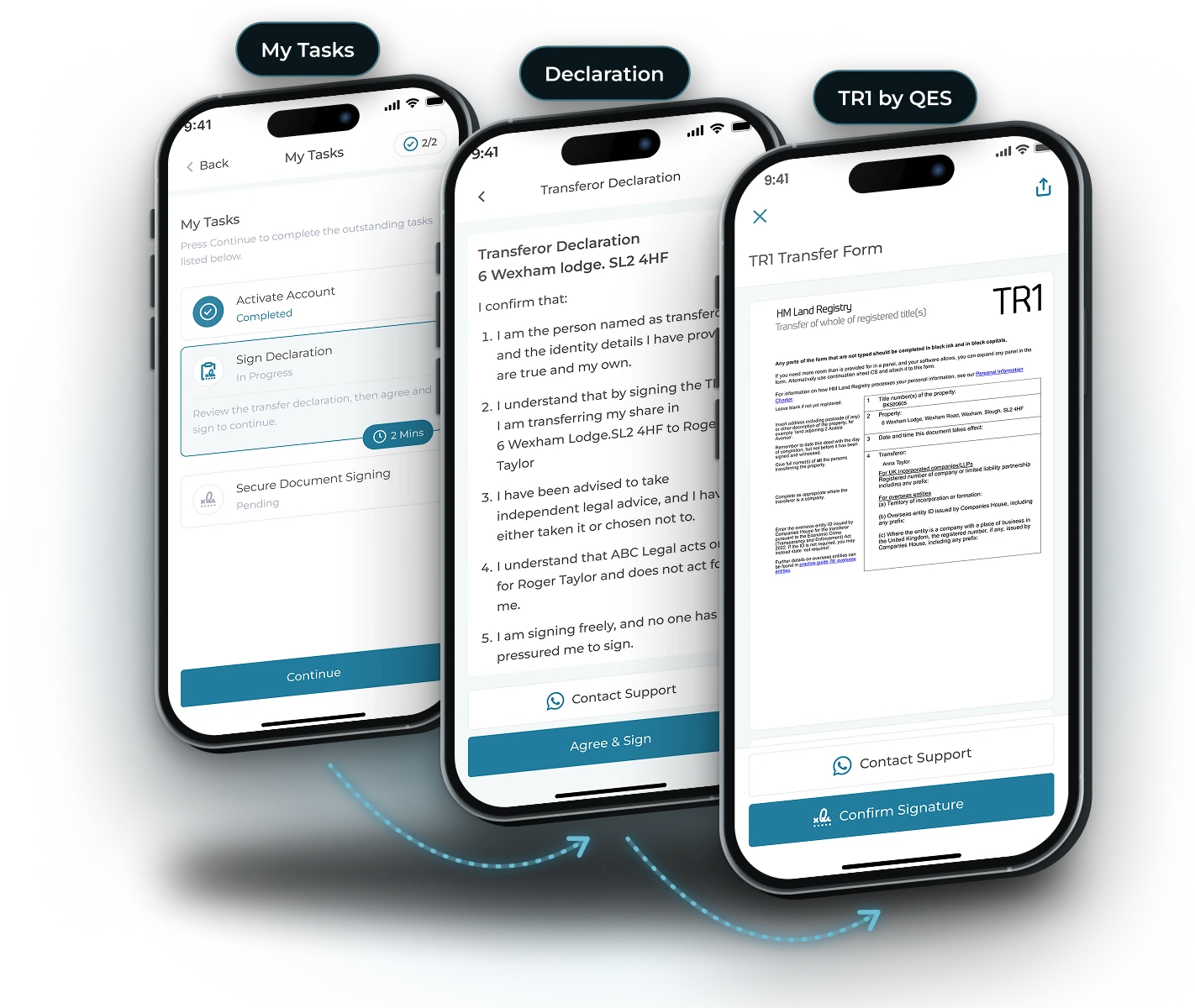
01
Transferor declaration
They confirm their identity, that the details are correct and that they agree to the transfer.
02
Biometric ID check
They then complete a biometric ID check on their mobile, matching their face against their photo ID.
03
TR1 signed by QES
And can now complete a Qualified Electronic Signature in under 3 minutes, with no witness needed.
Veyco app screens for the person leaving: My Tasks, the transferor declaration and the TR1 signed by QES
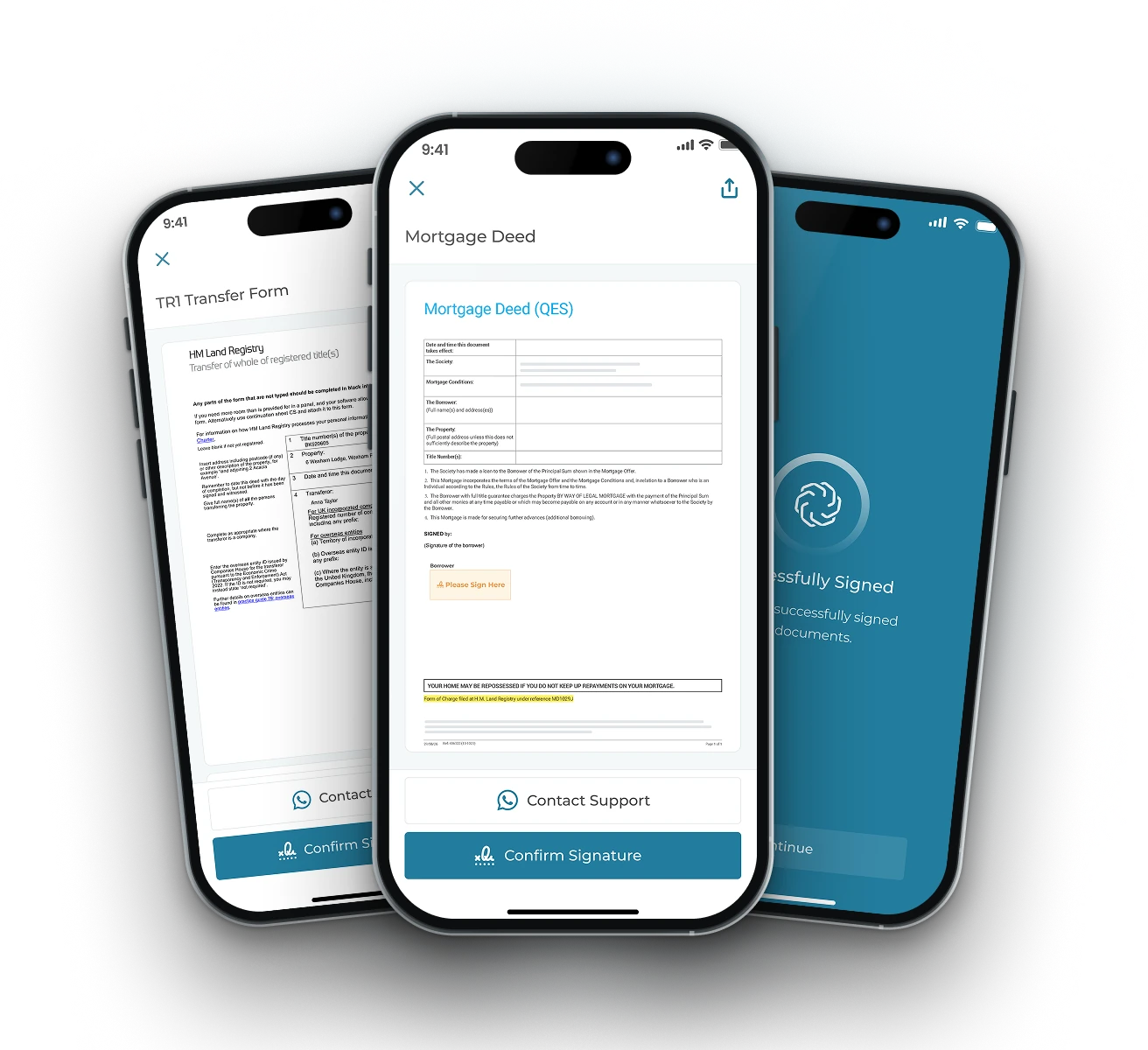
01
Biometric ID check
One face match against their photo ID covers every document they sign.
02
TR1 signed by QES
Straight after the ID check, signed on their phone. No witness needed.
03
Mortgage deed signed in same flow
Signed straight after the TR1 where the lender accepts QES. Print and post if not.
Veyco app screens for the person staying: the TR1, the mortgage deed and the successfully signed screen
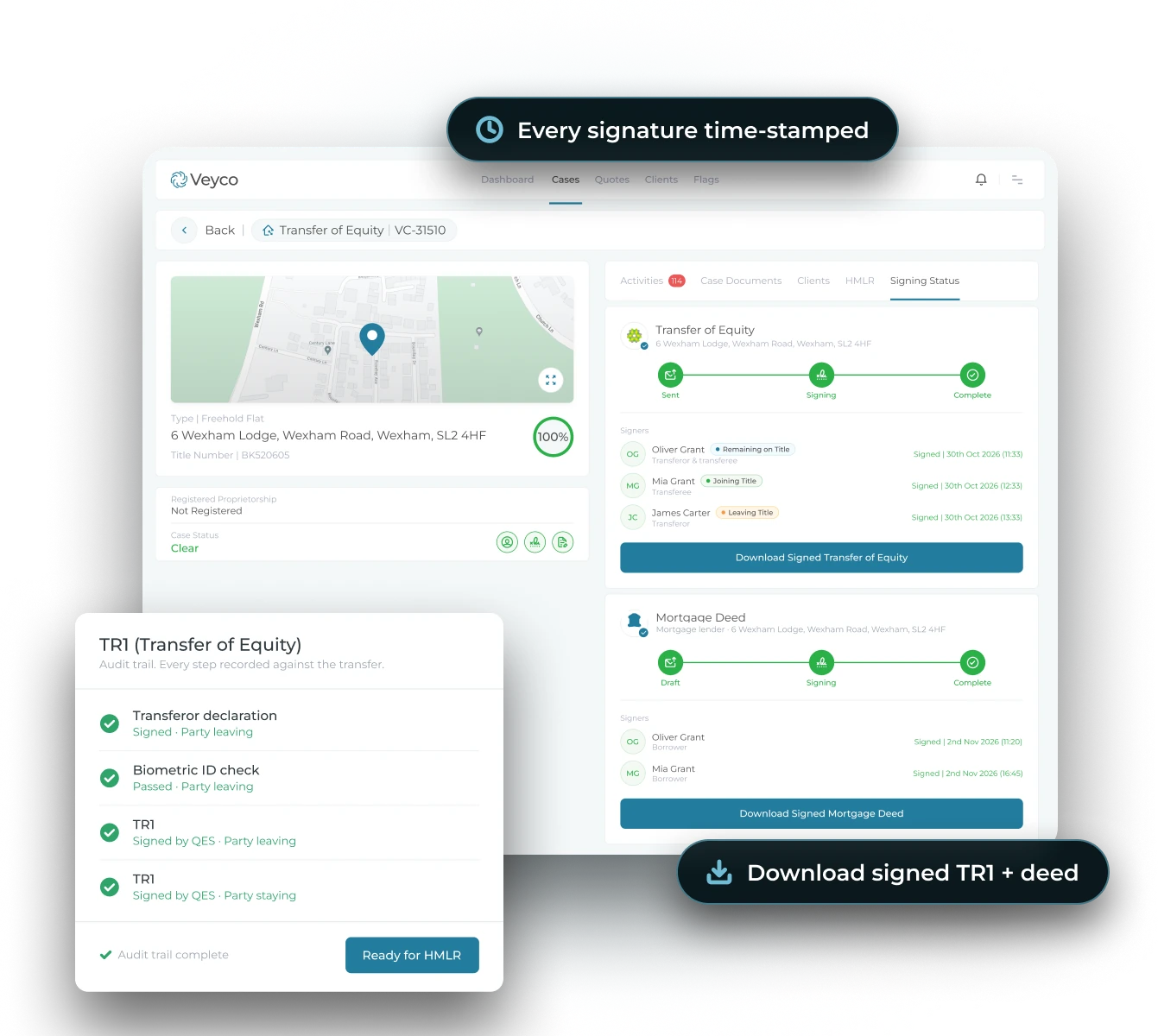
01
A full digital audit trail
Every ID check, declaration and QES signature is time-stamped and recorded against the transfer.
02
Download and send to HMLR
The signed TR1 and audit trail land in your case. All your team does is send them across with the AP1.
03
No chasing, no posting
No ID1 to chase, no wet signatures in the post and no forms expiring. Straight to HMLR submission.
Veyco case dashboard showing the signing status of the TR1 and mortgage deed, with a time-stamped audit trail
← Back
1 of 4
Next: Person leaving →
When it happens

When does a transfer of equity occur?

Separation or divorce
One partner transfers their share to the other.
Marriage or a new partner
A sole owner adds a spouse or partner.
Gifting to a family member
A parent passes a share to an adult child.
Buying out a co-owner
A friend or partner sells their share to the owner staying.
Restructuring ownership
Owners rebalance shares for financial planning.
For the person staying

Staying on the Title?
Sign It All in One Go.

No second appointment. No printing. No posting a deed back to the lender. One ID check, then the TR1 and the new mortgage deed are signed by QES, back to back, in the same flow.
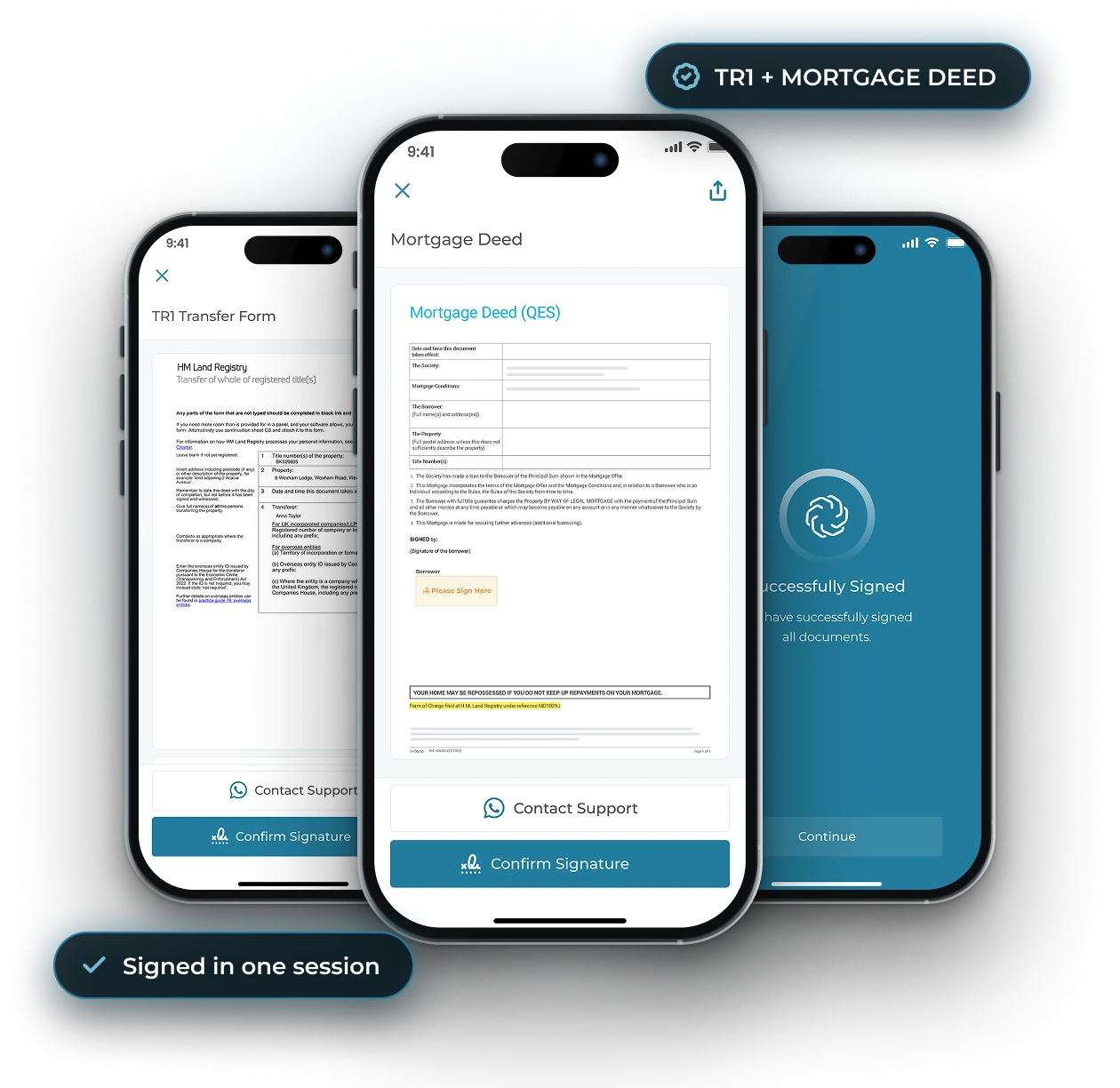
One ID check, two documents signed
TR1 signed by QES in under 3 minutes
Mortgage deed signed straight after
Veyco app showing the TR1, the mortgage deed signed by QES and the successfully signed screen, all in one session

START TO FINISH

One Sign In. One Journey.

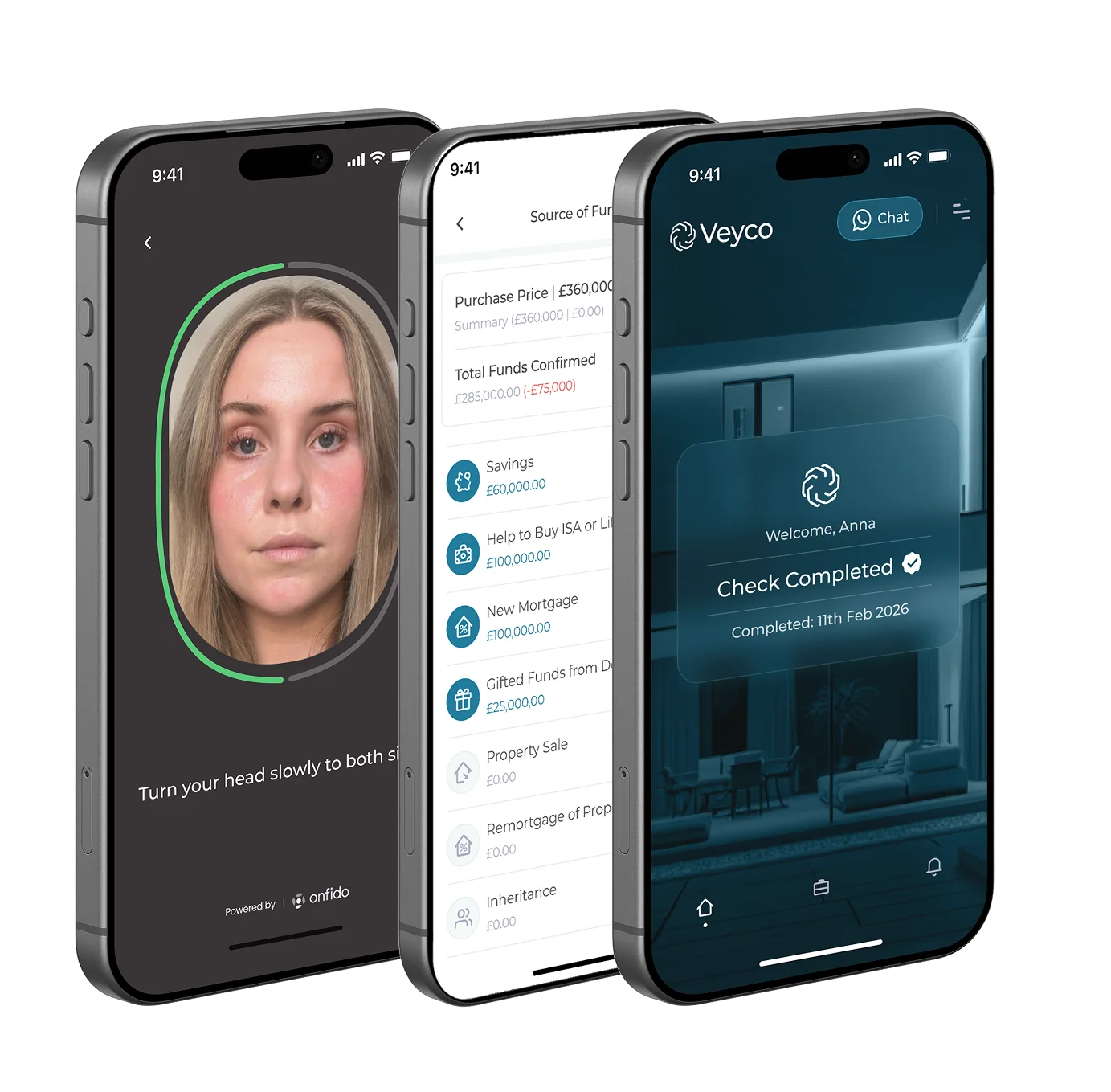
Most firms run onboarding, ID checks, source of funds, SDLT and digital signing through separate tools. Veyco does it all in the same app, one seamless journey and one risk report.

01
Onboarding
↓
02
ID + AML Checks
↓
03
Transaction Funding
↓
04
Digital Transfer of Equity
↓
05
Tenancy Referencing
↓
06
QES
Veyco app screens: face scan ID check, source of funding list and check completed
WATCH · 60 SECONDS

The whole transfer, start to finish.
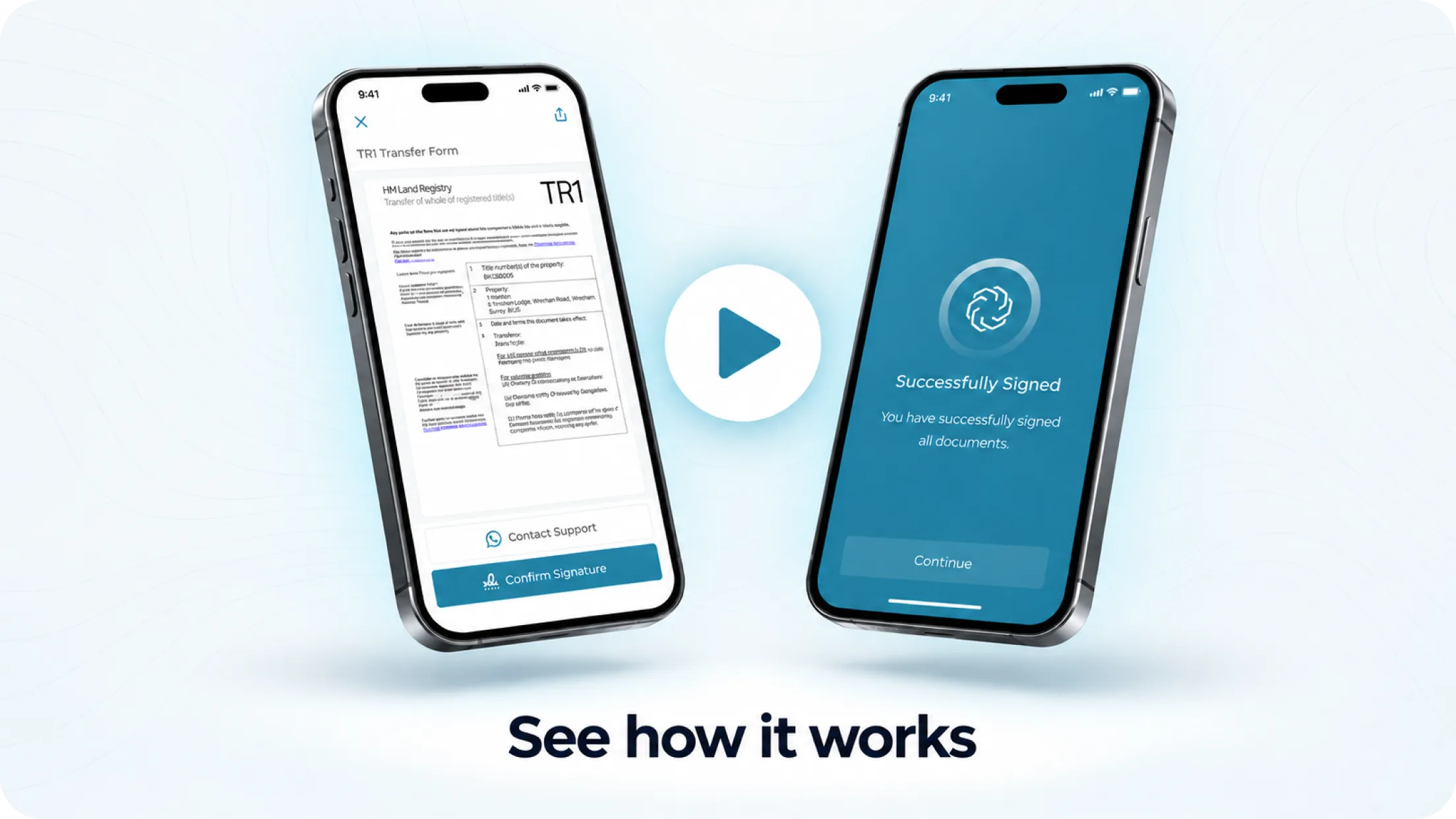
Video: a digital transfer of equity in the Veyco app, from invite to TR1 signed by QES
Signed in under 3 minutes
No ID1 form
No witness
HMLR ready

Take the ID1 out of your
next transfer of equity.

See a transfer of equity signed by QES, start to finish, in a 20-minute demo.

TRANSFER OF EQUITY EXPLAINED

Frequently Asked Questions

Who signs what?

The person leaving signs a transferor declaration, passes a biometric ID check and signs the TR1 by QES. The person staying passes the same ID check, then signs the TR1 and their new mortgage deed in the same flow.

Does the person leaving still need an ID1?

No. Their identity is verified in the Veyco app and the TR1 is signed by Qualified Electronic Signature, which HM Land Registry accepts. No ID1, no in-person appointment and no witness.

Does every lender accept QES on the mortgage deed?

Not every lender yet, so check with the lender first. If a lender does not accept QES, the mortgage deed is printed and signed in the usual way.

How long does it take?

Most parties sign in under 3 minutes once their ID check is complete. It all happens on their phone.

How do we send it to our clients?

Invite every party from the Veyco Partner Portal, or direct from your case management system via API. You get the signed TR1 back in the same place.

Does it replace legal advice for the person leaving?

No. QES replaces the ID1 form, not legal advice. Your firm's usual advice and client care requirements still apply.

Message us on Whatsapp
1
Scan this QR Code
2
Open Whatsapp
3
Start the chat
1
Scan this QR Code
2
Open Whatsapp
3
Start the chat
1
Scan this QR Code
2
Open Whatsapp
3
Start the chat
1
Scan this QR Code
2
Open Whatsapp
3
Start the chat
Speak with Ella
our AI Support Agent

Ella can assist you with any support or account based enquiries you may have. Simply dial the number below and start talking, it’s that simple.

The image of Ella, support agent of Veyco.
Ella

Support Agent

A whatsapp icon in white.
Chat